

Telemetry
Learn how telemetry data is ingested, stored, and routed within the Kamea IoT platform.
3 min
3 min
4 min
3 min
3 min
3 min
3 min
3 min
5 min
Telemetry is timestamped data, usually in a key/value format (temperature: 25, humidity: 70 etc.). In Kamea, telemetry is at the heart of device monitoring. Connecting a device to the platform isn’t just about configuration, it’s also about collecting, storing, and leveraging its data in real time. This flexibility is essential for managing your IoT systems.
Why telemetry matters
- Monitor device status
- Analyze trends (e.g., averages, alerts)
- Trigger automated actions
Data ingestion: flexibility first
Kamea does not impose any format on the packages sent by devices. This approach provides a high flexibility: there’s no need to define a template or a predefined structure for telemetry. Once the device is provisioned and connected to a communication channel, it can freely push its data. The platform automatically decodes and stores it.
For ingestion, Kamea supports multiple channels:
- IoT Hub,
- HTTP,
- MQTT.
Each channel uses codecs to interpret the data format. The default codecs are CSV, JSON, and Protobuf. For Protobuf, you must provide the definition file so the platform can decode the payload. This architecture is extensible, allowing you to add custom codecs for proprietary formats.
Kamea does not restrict the structure of the data sent. For example, with JSON, there are no constraints on keys or values; the device can send whatever it needs, and the platform adapts to extract and store the information. The only limitation comes from the underlying protocol, such as IoT Hub, which enforces some quotas. This flexibility makes it easy to integrate heterogeneous devices without extra effort.
Storage: time-series & instant state
Once telemetry is ingested, it is stored in databases suited to its nature.
By default, Kamea supports InfluxDB, a time-series database designed to handle timestamped key/value points. InfluxDB offers advanced features such as calculating averages over sliding windows and running complex queries for trend analysis.
Additionally, Kamea supports Redis, which is not a time-series database but is used to store the latest known value for each key per device. This provides an instant snapshot of a device’s state without keeping the full history. This approach is particularly useful for testing scenarios or for clients who don’t need to retain all data.
Kamea’s architecture is built to evolve. We have already developed custom connectors for some of our customers, such as Azure Data Explorer and PostgreSQL. The goal is to make it easy to add new connectors to meet diverse needs, whether for Big Data or AI-driven analytics.
Routing data with wildcards
Kamea offers an advanced telemetry routing mechanism, allowing them to be distributed across multiple databases based on their keys. This mechanism is inspired by MQTT topics and uses wildcards to define flexible rules.
Two types of wildcards are supported:
- # replaces multiple levels in a key (example: position/# covers position/x/y or position/gps/latitude).
- + replaces a single level (example: a/+/c covers a/b/c but not a/b1/b2/c).
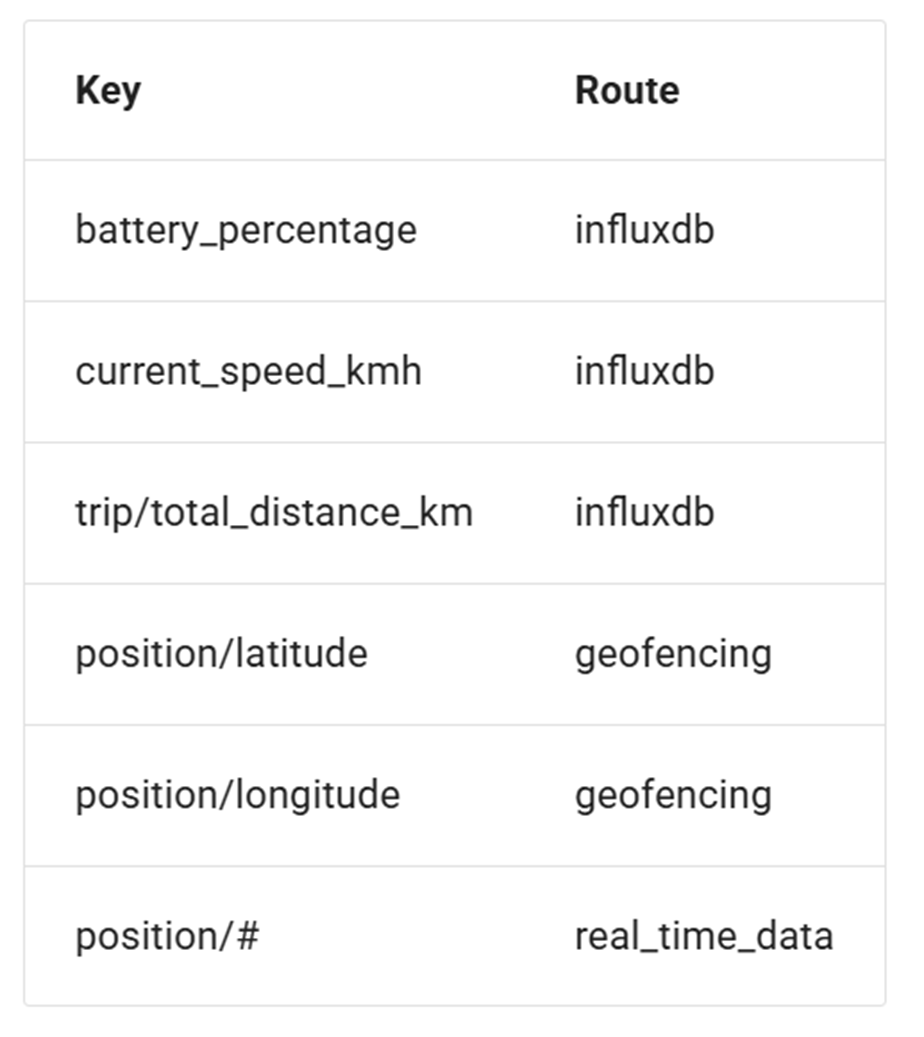
With these rules, you can route certain telemetry to InfluxDB (e.g., all keys related to temperature) and others to Redis (e.g., position data). Routing is defined at the Device Type level, providing maximum granularity (each device type can have its own data distribution rules).
This flexibility is essential to meet different client use cases. Some need data for Big Data processing, while others simply display it in Kamea. Routing ensures telemetry is stored in the right place for the right purpose.
Use your telemetries
Access your data via our API or directly manage your database and advanced features like flux requests with InfluxDB.

With Kamea, you benefit from complete flexibility:
- Open formats and extensible codecs.
- Multi-database support with advanced routing.
- Scalability for future needs (files, Big Data, AI).
Connect, ingest, store, route: Kamea adapts to your IoT architecture.