

Welma Secure Boot mechanism
Deep dive into Welma secure boot mechanism.
2 min
3 min
5 min
3 min
3 min
3 min
4 min
3 min
5 min
2 min
2 min
Secure Boot primary goal is to ensure that only your authentic software runs on your hardware. This mechanism is built on the concept of authenticity and relies on a complete chain of trust, starting from the processor’s ROM code and extending all the way to application launch.
Why secure boot matters
- Integrity: Guarantee that the software being executed has not been tampered with.
- Compliance: Certain standards require this mechanism, sometimes it’s mandatory, sometimes recommended.
- Risk management: Based on your security assessment, enabling Secure Boot can be a strategic decision to protect your product and brand.
Secure boot activation in Welma
Welma provides an integrated approach to simplify secure boot implementation while respecting hardware and software constraints in embedded systems.
Activation is done through a dedicated configuration: WELMA_SECURE_BOOT = “1”.
This will build:
- Needed Linux configuration for secure boot
- Images signed and provisioned with defined keys: WELMA_KEY_SWK1_PUB, WELMA_KEY_SWK1_PRIV, WELMA_KEY_SWK2_PUB, WELMA_KEY_SWK2_PRIV
A complete chain of trust based on 3 major steps
Secure Boot works through a series of cryptographic checks at every boot stage. Welma organizes this chain into three levels:
1. ROM Code → Bootloader
The processor validates the bootloader using a public key which hash is stored in OT P (One-Time Programmable) memory. This key is flashed only once, ensuring it cannot be modified later. This step is hardware specific.
2. Bootloader → Kernel
Once authenticated, the bootloader verifies the kernel signature. Welma automatically injects the public key into the bootloader and signs the kernel with the corresponding private key. This process uses U-Boot Verification, a standard feature that ensures validation before loading the kernel.
3. Kernel → Partitions and Applications
The kernel checks the integrity of partitions and file systems using dm-verity, a software stack that calculates and verifies hashes for large volumes. Welma provides tools to generate these hashes, sign partitions, and inject keys into the kernel.

Key management and automated scripts
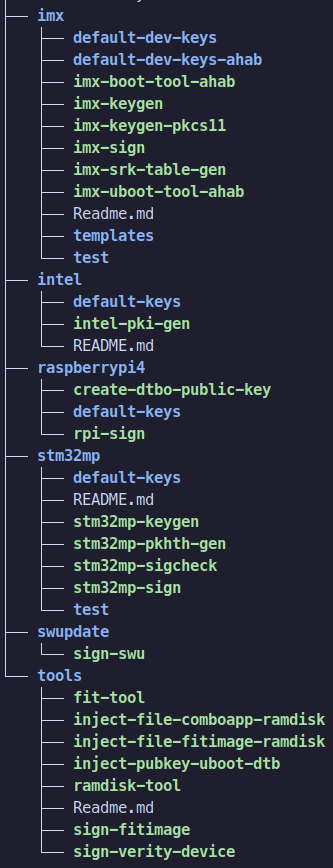
Welma includes a set of scripts to automate critical operations:
- Key generation and signing: Scripts sign the bootloader, kernel, and partitions with your private keys.
- Public key injection: Each binary receives the public key required to validate the next stage.
- OTP flashing: For each supported processor, Welma provides a generic script to flash the initial hash of the public key into hardware. This step depends on your manufacturing process, but Welma guides you with instructions tailored to major processor families.
These scripts can run within the Yocto build process or outside Yocto, for example, in a secure area dedicated to binary signing.
Development vs. Production Signing
Welma supports two distinct signing workflows to match your security requirements:

Development environment
During development, signing can be integrated into the Yocto build process. This approach accelerates testing and iteration while maintaining integrity checks. Keys used in development should be temporary and isolated from production keys to avoid compromising final security. Here, public and private keys should be specified via environment variables: WELMA_KEY_SWK1_PUB, WELMA_KEY_SWK1_PRIV, WELMA_KEY_SWK2_PUB, WELMA_KEY_SWK2_PRIV.
Production environment
In production environments, private keys should never reside in the build environment. Welma addresses this by providing dedicated scripts for signing outside Yocto, available in the welma-signing-tools repository.
Signing scripts include:
- Bootloader: Hardware-specific (e.g., imx-sign for i.MX platforms)
- Kernel: sign-fitimage
- Partitions: sign-verity-device
Public key injection scripts:
- ROM Code: Hardware-specific
- Bootloader (SWK1): inject-pubkey-uboot-dtb
- Kernel (SWK2): inject-file-fitimage-ramdisk
This separation ensures a secure workflow where sensitive keys remain protected in controlled environments.
To go further you can enable HSM or PKCS#11-based signature mechanisms.
Discover more about how prod vs dev images are managed in Welma.
Flexible configuration
Welma gives you the choice between distinct keys for the bootloader, kernel, and partitions, depending on your security policy, processor and design choices.
Each public key is defined in the Yocto configuration, and Welma references the associated documentation (SWK1, SWK2) to simplify setup.
Conclusion
With Welma, you have a turnkey solution to enable secure boot on supported hardware platforms. We provide:
- Scripts for signing and key injection.
- Integration into the Yocto build process, or standalone execution for secure environments.
You remain responsible for generating and protecting your keys, defining business processes for key management, and handling manufacturing steps.
Welma delivers the structure, tools, and flexibility to secure your embedded systems from the very first boot.
To dive deeper consult Welma documentation on all our supported boards (iMX, STM32MP, RaspberryPi and more).